Pages

Thursday, April 4, 2013

Mobile computers are much more than a phone


The rush is on to be the first company/organization to have people paying with their phone.  Mastercard, Paypal, Square, are just a few of the businesses competing for the consumer to buy and spend using their smart phones.  But, as the name of this blog implies, a smart phone is a mobile computer in your pocket.  What can we do now because we have a computer in our pockets and access to all the information on the internet from anywhere in the world?  At least anywhere we have cellular service?


Some examples of how the world has changed our ordinary lives:
  • 1)      Phone books do not exist any longer.  Oh, every now and then I have someone drop off a phone book on my front porch which these days I just carry right to the recycle bin.
  • 2)      Getting directions to or knowing where a business is located is now the sole domain of cab drivers.  All of us just enter the business name into apps like Google Maps or AroundMe and we have access to their website, directions to their business, and customer reviews at our finger tips.
  • 3)      When was the last time you printed and framed a photo or placed a picture in a photo album?  Film has long ago met its demise as digital cameras emerged, but now we have online photo albums, re-live memories as we swipe through photos on our phone. 
  • 4)      Your smart phone has emerged as a universal remote that can program your thermostat, record TV shows, act as a coupon wallet, scan prices at the mall, and even order coffee for you at Starbucks.
  • 5)     Your phone has become a bank teller, able to accept your check deposit anywhere there is a cellular signal. No more long lines at the bank on pay day, the full functions of an ATM are not there yet, but coming soon i'm sure. For now, you can transfer money between accounts, but no cold hard cash yet. 
  • 6) We now have our own personal shopper constantly scanning for sales of items that i want to buy. With apps such as Hukkster that search websites and retail catalogs for sales and price changes and send you an e-mail when your desired price has been reached. 
And today, Facebook announced a new way to become a part of the computer in your pocket.  Instead of having to select the Facebook App to check on the newsfeed from all my friends, I now can have Facebook as part of the operating system of my phone.  Facebook has taken over the home screen of a cellular phone and will run Facebook apps within or in the background of all other apps because it is part of the OS.  Just as more than half the internet users of the late 1990s used Internet Explorer and MSN for e-mail because these two icons were on the desktop of every Windows computer, Facebook is hoping that they can see the same level of success by owning the home screen of mobile phones.

Originally, there was a race to have consumers use their phone for payments, now the race has shifted to how many times a day can you get a consumer to open you app, or visit your online store.


Tuesday, February 26, 2013

How a mobile app gained a customer

For the past five years my wife has shopped at Albertsons, Trader Joes, Win Co, and Costco because Safeway was too expensive. Her complaint could be summarized in one sentence when she would lament, "I spent $25 and only got two bags!" So, for the past two months, I have been surprised to shop with her at Safeway, and the only thing I can attribute the change to is the Safeway mobile app, "Just 4 U".

I downloaded this app originally because I was a skeptic and did not believe that I would save "20% more on my weekly groceries" as their advertisement claimed. I would use the app sporadically, when ice cream was on sale, donuts, candy, the basic staples. Every now and then, I would have a coupon for something on our shopping list and would boast to my wife that I had saved $1.00 on eggs or cheese or ground beef. My favorite times would be as we were in Costco and I could show a coupon on my phone showing a gallon of milk was 10% less at Safeway.

The transition from shopping at other stores to doing weekly grocery shopping at Safeway was a slow process. Similiar to a person swimming that begins by dipping your toe into the pool, then your entire leg, until you slip off the side and plunge your whole body underneath the water.

It began with checking the app when we had run to Safeway to pick up a few things for dinner. We were in the store already, and if we checked the app and bananas or French bread or some other thing we normally purchased was. On sale, we would pick that up, too. 

Next, of we were shopping in Albertsons or Codtco or a different store we could compare prices instantly. In the same way that customers stand in Best Buy or Toys 'R Us and look for a cheaper price somewhere else. My wife and I would compare prices with Safeway. If it was a significant savings, we would make a trip to Safeway to buy something. 

The final step was when Dana discovered that there was an iPad app. Now, she sits with the Sunday paper, her coupons, and plans a menu for the week based on what is on sale. Safeway had a customer. Now granted, we do not shop exclusively at Safeway, but in terms of dollars and cents. Before the app, we spent an average of $60 per month at Safeway. Now, with app on our iPhone, we spend more than $170 per month at Safeway. More of our monthly grocery money is now going to Safeway. We are one family, one customer, but if each of your customers tripled the amount they spent in your business each month, your revenues would increase and the cost to develop a mobile app would pay for itself. 

There are also other features that my wife appreciates such as the grocery list. She can touch items on her iPad and in a number of simple touches, she has created a shopping list and put it in my iPhone, too. Now, she doesn't have to worry about me remembering most of the things on the grocery list, but forgetting two or three things that she really needs to make dinner. I guess I appreciate that feature too, because it reduces the number of times I have to drive to Safeway for forgotten items. 

Yes, Safeway, the reason we shop at your store again is your mobile app. 

Tuesday, January 15, 2013

Document Storage

California became the 7th state to pass a law allowing drivers to show proof of auto insurance on their smart phone if they are pulled over for a traffic stop. Joining Idaho, Colorado, Arizona, Alabama, Minnesota, and Louisiana as the other states that allow drivers to display proof of insurance with a Smart Phone.  Now, not only will companies want their customers to go "paperless" and reduce their mailing costs, but it will be delivered to the location (i.e. device) that also benefits the consumer.

Insurance companies like Geico, USAA, and Allstate have all developed Apps that consumers can download that allow them to pay their premium, update their policy or personal information, file accident reports from the scene of the accident complete with pictures from the customer's iPhone, and many other features.  Now, from payment to delivery of insurance documents can all be done via smart phone.  The legislative leaders and legal system is just catching up and trying to remain current.


Thursday, November 29, 2012

Smart Phones are Treasure Chests of Consumer Data

The question that I ask myself these days is, would you rather lose your wallet or your iPhone?  Without hesitation, it is my wallet.  Yes, it is a hassle to call several different banks and cancel credit cards, and I would dread another trip to the DMV to stand in line for the inevitable ugly driver license photo, but really, I have more irreplaceable information on my iPhone than I do in my wallet.  My smart phone is like losing my address book, my rolodex, access to my e-mail, internet connection, Thomas Guide map book, CD Player and 50 of my favorite CDs, my notebook for mileage and tax receipts, my envelope full of grocery store coupons, laptop computer (with a small hard drive), and knocking over my Scrabble game all at the same time.  Yes, my credit cards and ATM cards are in my wallet, but soon enough, those will be in my smart phone, too.

The Progression of Data Mining

We have all heard about data mining by retailers and marketing companies and with the recent presidential elections, even political parties are refining the art of data mining for each and every undecided voter out there.  Way back when data mining started, large companies like credit bureaus started gathering huge troves of information from scattered sources to create a consumer profile.  As more information became available online, and more large companies and websites could collect information about a consumer through there web browsing history, the amount of data available increased and details for each consumer profile could be filled in.  Then, with the advent of the social networks such as Facebook or LinkedIn, the consumer profile was expanded to include not only information about me, but information about who I was friends with, common interests, etc.  Smart phone apps just extend the reach of data mining from just the laptop or desktop the customer is using to their smart well, too.

Your App is the Key to Unlock Data

Continuing with the need for a retail company to  have an app.  In Christmas 2011, retailers worried about lost revenue as consumers stood in their store, selected the model computer they liked or style of shoes that fit best, and then used a bar code scanner app on their smart phone to order it cheaper from an online store.  This year, retailers developed apps of their own to combat the bar code scanning consumer, but they have discovered other benefits in addition to customers purchasing items from their stores.  Every retailer with an app has a direct link to each consumer that downloads that app, and by downloading that app, consumers are giving retailers access to all the information on their smart phone.

I listened to Morning Edition the other day and "according to ComScore, which tracks Internet traffic, the Monday after Thanksgiving is expected to be the biggest online shopping day ever, with something close to one and a half billion dollars in sales, 20 percent more than in 2011."   Retailers will track each consumer with their App to determine their location and which store they frequent.  The Wal-Mart smart phone app uses your location information to know which store you're in, will check and see if the item you are looking for is out of stock, and if it is, will direct you to their online store.  There are other stores that "actually keep track of how long you have been in their stores, and they'll send you coupons for every few minutes you're there."  I included the link to the entire article if you would like to read the full transcript on the NPR site:  http://www.npr.org/2012/11/26/165945317/tech-week-ahead-cyber-monday

An Overall Strategy

Apps are more than a sales tool today.  A smart phone app for your business can be the key to knowing who your customers are, what their spending behaviors are, what their favorite store is, and so much more.  Not only should your App be driven by the need to increase sales, but also to increase the effectiveness of your marketing campaigns.

Friday, November 9, 2012

Smart Phones Continue to Replace Computers

This link is to an ABCNews story.  I thought is was interesting that a smart phone was used to create the cover photo of Time magazine.

http://abcnews.go.com/blogs/technology/2012/11/iphone-photo-of-hurricane-sandy-makes-the-cover-of-time/

Time magazine sent photo journalists out to capture images of Hurricane Sandy, but instead of using high end, sophisticated cameras and lenses, they used their iPhones to capture iconic images of the storm.  This one made the cover of Time magazine.

Wednesday, November 7, 2012

Mobile Apps and Retail Sales

The bar code scanner Christmas

Christmas is coming, but are the retailers ready to compete in the mobile app economy? Christmas 2011 became known as the bar code scanning app Christmas. Consumers would browse for items in stores and shopping malls, decide which item they wanted, and then would scan the bar code label for a cheaper price at another store nearby or online. Retailers like Best Buy became customer showrooms while sales were completed on the Internet or somewhere else.  I often said that the most effective sales tool retailers could have used to improve their sales last Christmas was thick walls and poor cellular service in their store.

My introduction to retailer specific apps began this past summer when I was with my wife in the Nordstrom shoe department.  It was the half-yearly sale and the store was busy.  My wife had looked at the website before we came to the store and had found the perfect pair of Robert Edelman boots and we had come to try them on.  The sale man was not sure which pair she was referring to and all the computer terminals were in use, so my wife got her iPhone pout and downloaded the Nordstrom App.  After a few quick touches, she was able to show the salesman a picture, and 15 minutes later we were walking out with new boots.

  • The salesman made a sale
  • Nordstrom now had customer history and a direct method to send my wife sales notices, coupons, free shipping notices, etc
  • It is estimated that 1 out of 4 shoppers
    use a smart phone while they shop
  • My wife was happy with her purchase and shared the app with her friends.

For 2012, are the retailers ready?

Let's look at various retailers and their mobile apps that are available for download today as Christmas 2012 approaches.  What features have retailers introduced so they increase sales to smart phone users this year.

1.  Allow a customer to scan a bar code and compare prices

To combat the single biggest challenge to retailers during the Christmas 2011 season, retailers have now included a bar code scanner in their apps.  The old phrase, "if you can't beat 'em, join 'em" applies here, too. However, instead of allowing a customer to scan a bar code and search online databases looking for the cheapest advertised price for any item, from any online retailer or brick & mortar store.  Now, the customer is directed to the retailer's store and can compare the price of the scanned item with that same item in their store.  I was able to compare the price of a board game, "Apples to Apples" at Toys 'R Us ($14.69), Target ($17.99), and Amazon ($18.99 plus shipping).

2. Allow a customer to purchase an item from their smart phone

The most important function of any app is to make it as easy as possible for a consumer to purchase a good or service from your company.  A mobile app is another sales channel that is within three feet of your customer 24-hours, 7-days a week.  I know that I will buy clothes or perfume for my wife this Christmas, Legos or other toys for my children, and a Starbucks gift card for my mother-in-law, neighbor, and sister, among others.  I can purchase all of these items using my smart phone with the Nordstrom App, Toys 'R Us App, and Starbucks App.  Imagine completing all of your Christmas shopping from your dentist's waiting room.  Each of these apps requires the customer to first enter a credit card that will be used for all their purchases.  The industry term is Payment Device of File (PDOF), but once a customer enters the credit card information and CVN or other security information, it is ready to be used for purchases any time, day or night.

3.  Allow a customer to browse and compare items

The "Classic Gentleman"
A successful app will let a customer search for a specific item such as black pants or red blouse, but it will also let you browse by a look or style.  The Nordstrom App and the Cabi App are two of my favorites in this category.  For those people like myself who are not naturally gifted in the world of fashion, I can search for clothes using style descriptions like "The Classic Gentlemen", "The Modern Man", or "the Style Seeker".  Even the font and italicized print tells me what kind of clothes are in the at collection and I probably would not fit there.  The Cabi App takes things one step further by allowing a customer to dress a model with different outfits, mix and matching colors and patterns with different blouses and skirts.  It allows a person to look at an entire outfit on a person before they even start to try it on.

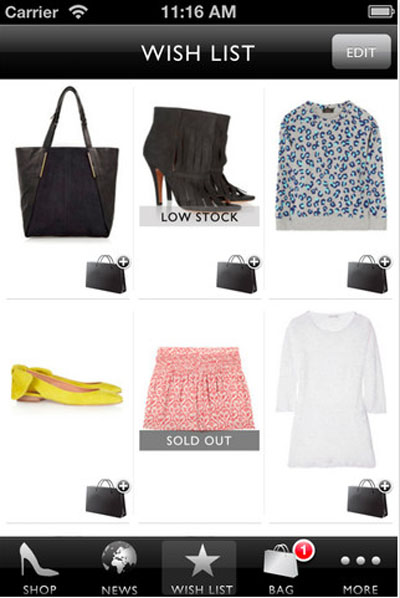
4.  Create a "wish list" to share with others

From Net-a-Porter App
The Nordstrom App is one of my wife's favorite, and at the same time, it has become one of mine, too.  She used to have the salesperson write down the name and size of what I was supposed to go buy and surprise her.  With the smart phone, she had progressed to taking pictures and sending text messages with the picture attached.  Now, the Nordstrom App allows a person to create and save a "wish list" that you can share with others (such as your husband), so they can know what to get for an anniversary, Christmas, or birthday present.

This wish list also has an added advantage for the retailer.  The wish list is also available to the retailer.  In the case of my wife, Nordstrom.  Now, Nordstrom can begin to build a customer profile of my wife and customize marketing and promotions to her.  She always receives text messages about every shoe sale and the opportunity for free shipping has also increased.

For now, there are less than 40 days left for Christmas shopping.  Good luck with a parking space at the mall, finding the sizes and colors you are looking for, and don't forget to bring your smart phone.  We will see how the retailers have fared in a few months time.