Pages

Wednesday, November 7, 2012

Mobile Apps and Retail Sales

The bar code scanner Christmas

Christmas is coming, but are the retailers ready to compete in the mobile app economy? Christmas 2011 became known as the bar code scanning app Christmas. Consumers would browse for items in stores and shopping malls, decide which item they wanted, and then would scan the bar code label for a cheaper price at another store nearby or online. Retailers like Best Buy became customer showrooms while sales were completed on the Internet or somewhere else.  I often said that the most effective sales tool retailers could have used to improve their sales last Christmas was thick walls and poor cellular service in their store.

My introduction to retailer specific apps began this past summer when I was with my wife in the Nordstrom shoe department.  It was the half-yearly sale and the store was busy.  My wife had looked at the website before we came to the store and had found the perfect pair of Robert Edelman boots and we had come to try them on.  The sale man was not sure which pair she was referring to and all the computer terminals were in use, so my wife got her iPhone pout and downloaded the Nordstrom App.  After a few quick touches, she was able to show the salesman a picture, and 15 minutes later we were walking out with new boots.

  • The salesman made a sale
  • Nordstrom now had customer history and a direct method to send my wife sales notices, coupons, free shipping notices, etc
  • It is estimated that 1 out of 4 shoppers
    use a smart phone while they shop
  • My wife was happy with her purchase and shared the app with her friends.

For 2012, are the retailers ready?

Let's look at various retailers and their mobile apps that are available for download today as Christmas 2012 approaches.  What features have retailers introduced so they increase sales to smart phone users this year.

1.  Allow a customer to scan a bar code and compare prices

To combat the single biggest challenge to retailers during the Christmas 2011 season, retailers have now included a bar code scanner in their apps.  The old phrase, "if you can't beat 'em, join 'em" applies here, too. However, instead of allowing a customer to scan a bar code and search online databases looking for the cheapest advertised price for any item, from any online retailer or brick & mortar store.  Now, the customer is directed to the retailer's store and can compare the price of the scanned item with that same item in their store.  I was able to compare the price of a board game, "Apples to Apples" at Toys 'R Us ($14.69), Target ($17.99), and Amazon ($18.99 plus shipping).

2. Allow a customer to purchase an item from their smart phone

The most important function of any app is to make it as easy as possible for a consumer to purchase a good or service from your company.  A mobile app is another sales channel that is within three feet of your customer 24-hours, 7-days a week.  I know that I will buy clothes or perfume for my wife this Christmas, Legos or other toys for my children, and a Starbucks gift card for my mother-in-law, neighbor, and sister, among others.  I can purchase all of these items using my smart phone with the Nordstrom App, Toys 'R Us App, and Starbucks App.  Imagine completing all of your Christmas shopping from your dentist's waiting room.  Each of these apps requires the customer to first enter a credit card that will be used for all their purchases.  The industry term is Payment Device of File (PDOF), but once a customer enters the credit card information and CVN or other security information, it is ready to be used for purchases any time, day or night.

3.  Allow a customer to browse and compare items

The "Classic Gentleman"
A successful app will let a customer search for a specific item such as black pants or red blouse, but it will also let you browse by a look or style.  The Nordstrom App and the Cabi App are two of my favorites in this category.  For those people like myself who are not naturally gifted in the world of fashion, I can search for clothes using style descriptions like "The Classic Gentlemen", "The Modern Man", or "the Style Seeker".  Even the font and italicized print tells me what kind of clothes are in the at collection and I probably would not fit there.  The Cabi App takes things one step further by allowing a customer to dress a model with different outfits, mix and matching colors and patterns with different blouses and skirts.  It allows a person to look at an entire outfit on a person before they even start to try it on.

4.  Create a "wish list" to share with others
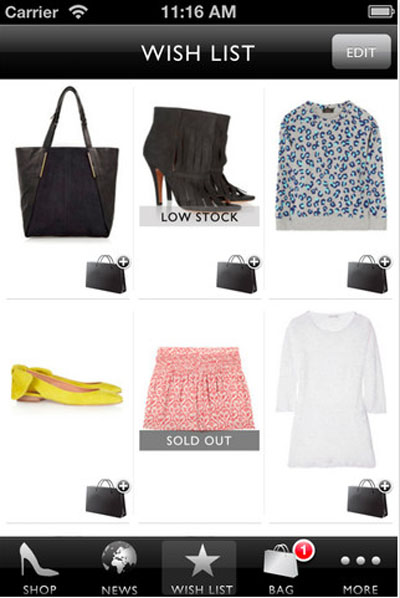
From Net-a-Porter App
The Nordstrom App is one of my wife's favorite, and at the same time, it has become one of mine, too.  She used to have the salesperson write down the name and size of what I was supposed to go buy and surprise her.  With the smart phone, she had progressed to taking pictures and sending text messages with the picture attached.  Now, the Nordstrom App allows a person to create and save a "wish list" that you can share with others (such as your husband), so they can know what to get for an anniversary, Christmas, or birthday present.

This wish list also has an added advantage for the retailer.  The wish list is also available to the retailer.  In the case of my wife, Nordstrom.  Now, Nordstrom can begin to build a customer profile of my wife and customize marketing and promotions to her.  She always receives text messages about every shoe sale and the opportunity for free shipping has also increased.

For now, there are less than 40 days left for Christmas shopping.  Good luck with a parking space at the mall, finding the sizes and colors you are looking for, and don't forget to bring your smart phone.  We will see how the retailers have fared in a few months time.

Thursday, November 1, 2012

Delivering Data in a 3.5 Inch Screen

Using Mobile Apps to Deliver Data
 
I was at the parents monthly meeting for our Boy Scout Troop and we were discussing various upcoming events and announcements that we would send out as an e-mail to all the boys and families in the troop.  We already have a monthly newsletters, but we send out e-mail reminders for sign up deadlines and as the event date approaches.  One of the parent made a comment that rings true in today's mobile environment.  "Don't make your e-mail too long because if i can't read it on my phone, I won't read it."  That simple statement should be heeded by businesses and organizations everywhere.  Your e-mail audience no longer reads your communications on a computer with a large screen.  Now, you need to delivering the critical information and data so it can be displayed on a 3.5 inch screen.
Mobile devices. They’re not just for playing games and talking anymore.

The first thing that comes to most peoples’ mind when they hear “iPhone app” is Angry Birds.  Maybe Fruit Ninja or Temple Runner, but mostly Angry Birds and other games. The iPhone and other smart phones are often seen as a fun toy. My father-in-law views them as smaller game consoles for the kids to play games on instead of an Xbox.  Some people have broadened their view so they see a smart phone as a convenient tool for consumers, maybe something that helps you get directions or can track your calories throughout the day, but also has fun games, too.  The next step is for more and more companies are viewing smart phones as a powerful computer with access to enterprise data and corporate networks. And the good news is, times are a changing.  Increasingly companies are seeing mobile apps (iPhones, Androids, Blackberrys, Palms, and maybe soon Windows phones) as critical tools for delivering data to users that are unchained from their desks, up and about, and not schlepping laptops to the nearest Starbucks.
 
Do you want to be able to communicate with thousand and thousands of potential customers that have a computer in their pocket and a smart phone at their side?  Before designing that amazing mobile app, here are a few tips to keep in mind:
  • It’s got to be fast. Processors on mobile devices are slower than those used by desktops and laptops. However, users are probably less, not more, patient. How many times have I waited for a map to re-calculate directions as I have sat at a stoplight wondering which way to turn.  It seems obvious, a mobile app by definition, is for someone who is moving and going places.  You’ll want to work with developers who can optimize your app for speed.  Speed is truly critical to the success and adoption of your app by end users.  Avoiding complex graphics that take a long time to load is a must.  As a simple test, if Angry Birds took three minutes to start the game, would you still play it

  • Reflect both brands—yours, and the device’s. The Starbucks App would be just any other retail app unless it reflects the Starbucks brand.  It is important not merely to convey your brand for marketing, customer loyalty, etc, but to do so in a way the fits the overall look and feel of the specific mobile device. The "Back" button in an iPhone app is in the top left corner, menu control buttons are along the bottom of the app screen.  Making your app follow the standards of other apps reduces the learning curve of a new user, increases users’ comfort with the app, and helps increase the likelihood that they will use it frequently.

  • Keep it intuitive.  From my own experience, if I cannot figure out how to use the app from looking at the screen or a two sentence instruction, I end up never using it and ultimately deleting it from my phone. I do not think I am alone.  Mobile users on the go have little patience for figuring out what to click.  People normally do not use "Help" menus on full screen computers, and there is less incentive to do so when the screen is 3.5 inches and the type is very small.

  • Simple screens are a must.  Clean, un-cluttered screens are the key to a satisfying and effective user experience.  The most complex graphic should be limited to the splash screen when the App opens the first time.  The primary screen of the user interface should have essential fields only.

  • Make buttons large.  Use big buttons and lists with values already entered for a user to choose from.  The less a user has to type to enter data and can simply click to choose their selection, the better the user experience will be.  It is important to keep buttons large enough to be easy to click, so users can work with the application and get results or enter data quickly and easily.

  • It’s about functionality, not a sleek appearance. Style is important – but the bottom line is, utility is even more important. If there are really cool graphics or an amazing font that is great, but the user reviews and recommendations to friends are about whether the app worked and how easy it was to use.  

  • Data transfer from web site is important. Mobile apps are becoming an extension of the corporate website and corporate network.  Significant effort must be taken in architecting and supporting Web services that enable import/export of data from your server to the mobile devices.  Windows and graphics should be sized correctly, data should be displayed in tables.  Remember, the data is still the same, but the delivery window is only 3.5 inches.


Tuesday, October 30, 2012

How Many Apps Are There

There are an endless supply of Apps out there for the consumer to download.  Really, the challenge at this point, is for the consumer to find the app that works for them and download it to their smart phone.  There are also apps for Apple iOS devices, and apps for Android devices, and apps for Windows devices, and the list goes on.  In addition to the question of "how many apps are there", let's begin with how many app stores there are, first.

There are four major app stores sponsored by large companies in an effort to increase their share of the smart phone consumer market.  There is the Apple App (iTunes) store, Google Play (Marketplace), the Microsoft App Store and the Blackberry App store.  There are also move than two dozen 3rd party app stores, ranging in size from Handango to mJelly, that developers will turn to in an effort to get their app more exposure before making their app available in one of the larger commercial app stores.  As we mentioned in the previous post on Mobile Marketing, the personal endorsement and sharing of apps from one person's smart phone to their friends smart phone is still the most common and most effective way a customer will download an app.

We did want to have one example of the explosive growth in apps over the past few years.  Using just the Apple App store as an example, the chart below shows the amazing year over year growth.  You will also notice as the number of mobile devices has grown, the number of apps has too. 


Based on Apple announcements and press releases
  According to ABI Research, "there will be 29 billion apps downloaded in 2011, up from 9 billion in 2010. In Q2 Android overtook Apple in terms of app downloads with 44 percent of downloads, compared to Apple’s 31 percent." 

While the rate of growth in the number of apps will begin to decrease in the next few years, the complexity and integration of mobile apps to corporate ERP systems will continue to accelerate.  Providing customers the information that they want and need to make a purchase or consume your services delivered in their hand, right to their pocket is the next marketplace for a company to win. 

Saturday, October 27, 2012

12 mobile marketing lessons


All of Your Marketing is Mobile, You Just Don’t Know it…Yet.  That’s the presentation Tim Hayden, the SVP of Mobile Strategy for Edelman Digital, gave at today’s virtual event: The Best of B2B Marketing Forum.  I added a few of my notes and comments below Tim's 12 lessons.  Great presentation!

1. Like social media, mobile should not be departmentalized. Both transcend across the brand.

As I have already mentioned, a mobile app is an extension of your website and your brand.  Just as the website content and development is not departmentalized, neither should mobile be departmentalized. 

2. Social media is big. But, mobile is bigger. It plays a part in our daily lives: home, work, store, and play.

I would rather lose my wallet than my mobile phone.  Aside from my driver's license, everything in my wallet exists on my phone -- credit cards, business contacts, pictures of my family, etc.

3. In fact, 90% of us are never more than 3’ away from our phones. From a business perspective, you’re 3’ away from your audience 24/7.

It could not be said any better!

4. Mobile goes places where laptops and desktops can’t. Tablets are still seen as “lean back” behavior. They’re what you crawl on the couch with.

Correct again.  My phone travels in my pocket...everywhere I go. 

5. Smartphones are for “on the go” behavior. We take them everywhere. And we don’t stare at them like we do desktops. We glance and we go.

6. Smartphones are social devices. Texting is the most popular thing we do peer-to-peer. There’s nothing more direct or personal.

Back in my days of Business 101, I learned a personal endorsement is more significant than any TV commercial ad campaign can be.   I text, send photos through Facebook and InstaGram, check-in with Facebook, and my wife takes pictures of Christmas gift ideas so there is no confusion about size or color.

7. Offline ad exposure leads to mobile search. We use our smartphones to search for answers to our questions and to help us make decisions. It’s our personal info kiosk. And our tour guide.

8. You need to make things simpler for your audience. It’s a missed opportunity if you’re making people look deeper for the relevant information. They may not look harder than where they are at that minute.

The best practices of web design stated that if you require  customer to make more than three clicks to find the information on a website, they will give up and move on.  Now, the first two clicks are go to room in house where computer is located, and turn the computer on.    

9. Most people don’t care about your PR or your board of execs when they’re on their mobile device. If they don’t have a pleasant and painless experience with your website, they’re going to leave—and they may not come back.

User interface and the user experience is key to success!

10. Facebook knows that more and more people are interacting with photo-based apps like Instagram and Path. A picture is worth a thousand words. This is why your pictures are now bigger on Facebook. They want to keep you engaged.

11. Mobile gives us a better and immediate way to share our experiences in life. But people are now expecting faster reaction times. The average social media user expects a response within 60 minutes. The immediacy of mobile makes us expect things to be there when we need them.

Once again, 90% of us are never more than 3’ away from our phones. From a business perspective, you’re 3’ away from your audience 24/7.

12. You have a responsibility as a marketer to educate your audience. If you’re going to introduce a new technology (like QR codes), you need to show them how to use it and what to expect.

Friday, October 26, 2012

An App is a "Convenient" Extension of Your Web SIte

A website allows a business to be open for customers 24 hours a day, 7 days a week.  Whether it is for window shopping, placing an order, answering a question, your businesses website acts as the first line of customer service.  However, your customer is not sitting in front of a computer screen 24 hours a day, 7 days a week.  It might feel like it to some of us, but it is true,  But how many of us always have our smart phones with us?  Now, your businesses website can be always accessible as a Mobile App installed on your customer's smart phones.  Whether they are home, at work, at a movie, or at a baseball game, if they have cellular service, they can reach your website.

In addition to having the same information or being able to buy something from your store, a Mobile App has the advantage of sending marketing messages, coupons, or even directions to your nearest store right to your customer's pocket.  There are businesses I have purchased items from more then once, but have never been to their store, if there was a store.  Imagine being able to have your website pop up a window and letting your customer know about a special 2-Day sale every time he or she turned on their computer.  With a Mobile App, now you can.

Let's look at one example.  The Starbucks App is a free downloadable app from the iTunes store.  It is free because if it is on your phone, the more likely you are to purchase their product and every person that downloads their app is now another customer to collect information about and refine your marketing.  The features include:


There are five opportunities for a customer to purchase something with the Starbucks App and only two opportunities with on the website.  Directions to the closest store are delivered right to the customer with the App, and special offers and coupons are delivered via SMS directly to the customer, without other e-mail messages cluttering their view.  the chance of a customer not opening an e-mail is eliminated with the App.

And once again, a customer will only view a website when they are in front of their computer.  With a mobile App, a customer can view a "website" while they are at home, in meetings, driving, or even while sitting at Starbucks enjoying a double decaf non-fat frappuccino double shot with a hint of cinnamon.

Wednesday, October 24, 2012

What is Web 3.0?

The last post claimed that Mobile Apps was the next Web 3.0.  So, before we explain Web 3.0, lets review some of the history of the web.

Web 1.0:  Way back in the year 2000, and everyone was trying to avoid the Y2K bug, every business was clamoring for a website of their own.  Now, instead of advertising in the yellow pages once a year, or the weekly insert in the newspaper, business could create colorful, customized advertising letting every customer for miles around all of the goods and services you could provide them.  Big businesses, local business, non-profit organizations, school, and even individuals created their own website and made a land grab in the world of the internet.  Radio and television commercials that ended with announcers repeating the familiar jingle now had an additional tag line to "check us at www.mybusiness.com"  Businesses no longer needed to name their business AAA Plumbing so they would be listed first in the yellow pages.  Instead, they could build brand identification, name recognition, and depending on the service, reach customers that lived outside their normal geographic region.  The world wide web had reached main street.

It is estimated that by April 2000, there were 15.6 million websites on the World Wide Web.  The growth from there was exponential.  According to CNN Technology, four years later there were more then 50 million websites and just 30 months later in October 2006 the number had doubled to 100 million websites. At the start of 2012, it is estimated that there are over 555 million websites.


Web 2.0:  Although the name sounds different, Web 2.0 was the same World Wide Web, but rather to the cumulative changes in the ways software developers and end users used the web.  In 2004, Web 2.0 blossomed and websites became interactive tools that allowed communication, orders, and information being exchanged between the business and the customer.  Some of the more well known examples of Web 2.0 technology was blogs, wikis, mashups, social networking, and photo/video sharing websites.  A business website was no longer a static page providing information outward only, but now a website was a tool that facilitated business, information, and collected user feedback.  End users were no just as likely to create content as they were to consume content.

Web sites were re-designed and re-configured so web applications would expose their functionality so hat other applications could leverage and integrate the functionality providing a set of much richer applications. To put it more simply, businesses were able to open up the large amounts of data and customer information to more effectively share it across their entire business.  Silos of information were broken down as websites with web-oriented architecture enabled a customer order made on a website to automatically, and simultaneously be shared with sales, accounts payable, warehouse and shipping, and the marketing department already working on the next sale.  Web 2.0 brought efficiency to businesses and an explosion of data to be leveraged by the business.

Web 3.0:  To many, Web 3.0 is something called the Semantic Web.  It is a term coined by Tim Berners-Lee, the man who invented the first World Wide Web.  In essence, the Semantic Web is a place where machines can read web pages much as we humans read them, a place where search engines and software agents can better troll the internet and find what we are looking for.  "it's a set of standards that turns the web into one big database" according to Nova Spivak, CEO of Radar Networks, one of the leading voices of the new age internet.

So how does that translate into mobile apps and smartphones?  Each app is a software agent that can be designed to search the large database of websites and deliver the information that a customer is searching for to the computer in their pocket.  Additionally, we can use data mining and GPS location to deliver even more finely detailed search information that is relevant to each particular customer.  The same app can deliver different search results based on key information provided by the customer.  Think of the change in advertising from the world of the 1960s Mad Men, if Don Draper could design one advertising campaign that was uniquely tailored to each individual customer.  They would have been even more successful than they are now!

The other part of Web 3.0 that is part of mobile apps is the push notification that allows an app developer to be able to communicate directly to each customer.  These updates can take a passive approach such as notification that a new version is available for upgrade to a more directed marketing message that a customer can download a coupon to a new feature is now available for use.  For example, Shazam pushed a notification to me, and potentially all their customers, that I can now listen to the World Series and track statistics during the game.  The other possibility is that this message was sent just to me as a baseball fan, and a different message could be sent to a 30-year old female who is a movie fan that the Academy Awards broadcast is available on this same app.

Web 3.0 is here, and the possibilities are endless.

Tuesday, October 23, 2012

Mobile Computing is the New Web 3.0

Things are changing as more people have computer in their pocket and Internet access any where they are at. Providing information to people, to customers, in a concise, compact manner is now foremost towards your success.

The first change that has been fairly well documented was the change in behavior of Christmas shoppers last year. Consumers would go to the store to look at the different products and compare the different features to determine which model they wanted, but then would use the computer in their pocket and scan the bar code for a price comparison. Amazon.com even had a $10 discount if you used their mobile app one weekend. So now, how can you deliver your information directly to a mobile audience with a four inch screen.

Now, computing technology is tied to GPS and other location based services to maximize information delivery to your audience. The Entertainment book has developed an application that allows the user to display the coupon on their mobile computer, and will detect all available coupon opportunities located around you. Complete with directions to each of the businesses. They have delivered all of the information included in the actual paper book in small chunks of information that includes location enhancements in small easy to display screens.